

HOW TO BOOK YOUR PLACE ON KIDS CAMP
To book a space on Kids Camp, please follow the steps below.
We have recently launched a new booking system. Even if you have booked Kids Camp before, you will need to complete all the steps below.
If the new system recognises your details during the sign-up process, you may be asked to reset your password and log in. If this does happen, follow the steps and then go to Account > Memberships > Add Membership and add on the relevant Kids Camp membership. You can then continue from Step 2 below.
Step 1 – Create an account
-
Follow the GoJoin link and select your preferred centre: Wymondham or Long Stratton.
-
Select Junior, followed by Pay as you go memberships, and then choose the relevant Kids Camp account – if you choose the concession option, proof will need to be provided.
-
Follow the on-screen instructions to complete the account creation process. Complete all details in the childs name.
Step 2 – Book a session
-
Follow the GoBook link and select Log in.
-
If this is your first time using GoBook, select Forgotten password and follow the instructions to set a password for your account.
-
Log in using your new password.
-
Choose the centre and date you would like to book, along with ‘Kids Camp’ from the activity dropdown. Then select Search.
-
Choose your preferred session and follow the on-screen instructions to complete your booking and payment.
Things to remember
-
If you’re booking for more than one child, you’ll need to create a separate account for each child.
- Ensure the account is in your childs name.
-
To cancel a session, visit the ‘My bookings’ section of your account.
- If you are using childcare vouchers or are entitled to concession pricing, please ensure you choose the correct option when signing up.
Got a question? Email kids.camp@southnorfolkandbroadland.gov.uk
SELECTING THE DATES AND SESSIONS YOU WISH TO BOOK
select the number of spaces you require on either full or half day sessions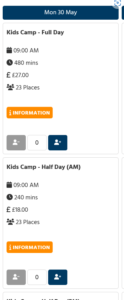
You can also add lunches if required at this stage
ONCE YOU HAVE SELECTED ALL THE SESSIONS AND LUNCHES YOU REQUIRE
simply select the next button at the bottom of the page
ADDING YOUR CHILDS DETAILS
 Click on the add new participant button to enter the details of your child
You will be askd to complete the emergency contacts, health and swimming permissions for each child as well using this section to request your choice of filling if you wish to add a lunchbox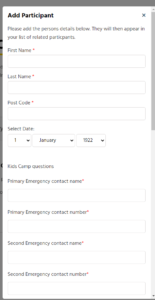 ex
ex
ADDING THE CHILDREN TO THE SESSIONS YOU HAVE REQUESTED
Click on the dates and add the child to the session  If you need to update any of the childrens details just click the edit icon
to add a child to a session click on the cross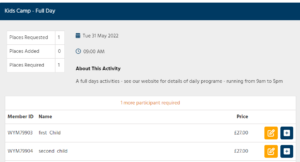
PAYING VIA CHILD CARE VOUCHERS
If you wish to make your payment via a child care voucher simply enter the name of the voucher provider in the box shown
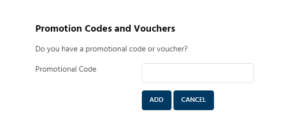
We accept the following childcare vouchers
- Edenred
- Computershare
- Sodexo
- All save
- Bravo (formally Busy Bees)
- Care4
- Co-op
- Faircare
- Fideliti
- Kiddivouchers
- NW Brown
- RG Benefits
- Salary Exchange
- VSL
- You At Work
- Tax Free Childcare
- Childcare Grant
- Caboodle (also known as Salary Exchange)
COMPLETE YOUR BOOKINGS
When you have completed your selections click the Book button at the bottom of the page
This will take you to the payment page (for parents using child care vouchers – payment is not required at this stage)
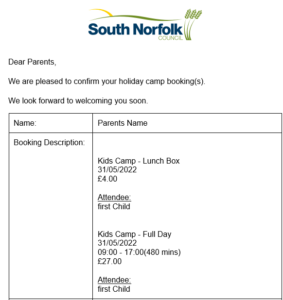
Once payment is complete you will receive a confirmation email
CANCELLING OR AMENDING YOUR BOOKINGS
If you wish to make a change to your booking or need to cancel a session please contact the leisure centre via email or phone and we will be happy to assist with this
wymondhamlc@southnorfolkandbroadland.gov.uk
lslc@southnorfolkandbroadland.gov.uk
or call
Wymondham Leisure Centre – 01953 607171
Long Stratton Leisure Centre – 01508 531444